Otter AI Alternative for Recorded Interviews and Lectures
Pick Transcriv if you transcribe recorded files, such as interviews, lectures, or recorded calls, and need a recording between 30 and 60 minutes transcribed in full for free. Its Free plan accepts one file up to 60 minutes and 100MB, within 60 lifetime minutes. Stay with Otter if you want a bot that takes notes in live Zoom, Teams, or Google Meet calls. Transcriv doesn't do live meetings at all.
On Otter Basic, a 90-minute video we imported used one of the plan's 3 lifetime imports and came back as a 30-minute transcript. The TXT export stops mid-sentence, with nothing in the file to say the last hour is missing.
Prices as of October 16, 2026. Free-plan limits as of October 19, 2026.
Where to start, by situation
| Your situation | Start with | Why |
|---|---|---|
| One 45-minute interview, free | Transcriv Free | Fits the 60-minute, 100MB file limit if at least 45 of your 60 lifetime minutes remain. Otter Basic transcribes the first 30 minutes |
| One 90-minute lecture, free | Neither free plan covers it in one piece | Otter Basic gave us the first 30 minutes. Transcriv Free rejects files over 60 minutes before upload |
| A few short recordings (under 30 minutes) | Otter Basic | Up to 3 imports, 30 minutes each, plus live recording in the app |
| A recorded file every week | Transcriv Pro or Otter Pro | Otter Basic's 3 imports never renew. Otter Pro includes 10 imports a month |
| Live Zoom, Teams, or Meet calls | Otter | Its Notetaker joins the call. Transcriv has no meeting bot |
| More than 10 hours of files a month | Otter Pro, billed annually | 1,200 minutes a month at $8.33/month. Transcriv Pro includes 10 hours |
Otter Basic's 300 monthly minutes look generous, but for uploaded files the limit that matters is 3 imports for the life of the account, each transcribed up to 30 minutes. That's at most 90 minutes of imported audio, ever. A journalist with one 45-minute interview gets two thirds of it from Otter Basic, and the whole thing from Transcriv Free.
Have a recording between 30 and 60 minutes? Upload it to Transcriv Free. If it's over the limit, you'll find out before it uploads.
What happened to a 90-minute file on Otter Basic
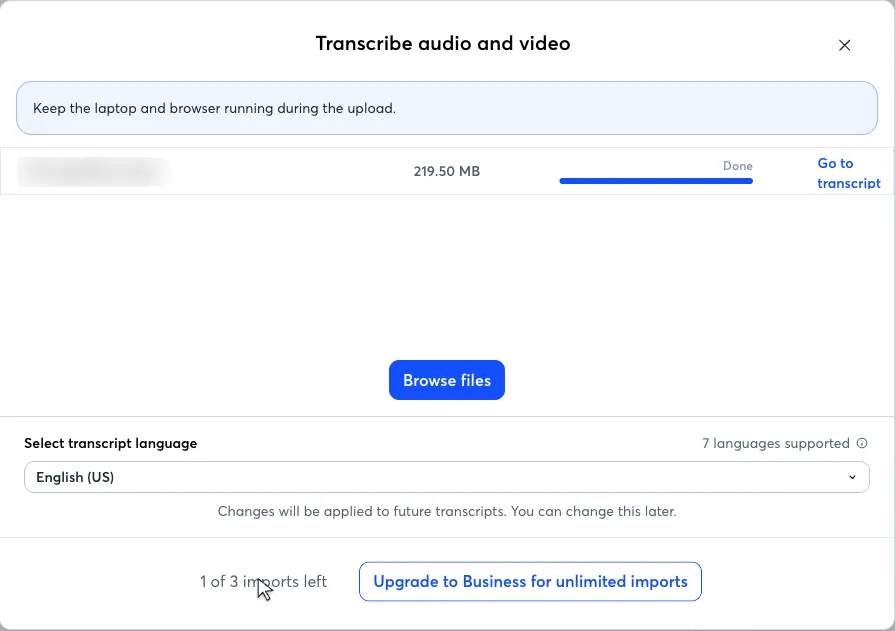
Otter needs an account before it transcribes anything. In October 2026 we imported two files into a free Basic account: a 29-minute interview and a 90-minute recording. The import dialog lists accepted formats and the imports you have left, but not the 30-minute limit per file. Choosing a file starts the import at once.
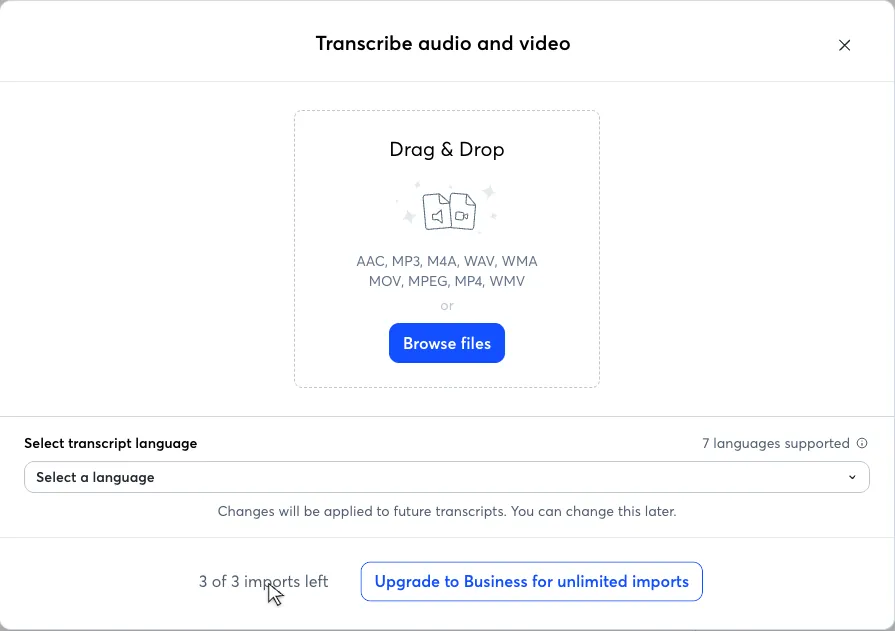
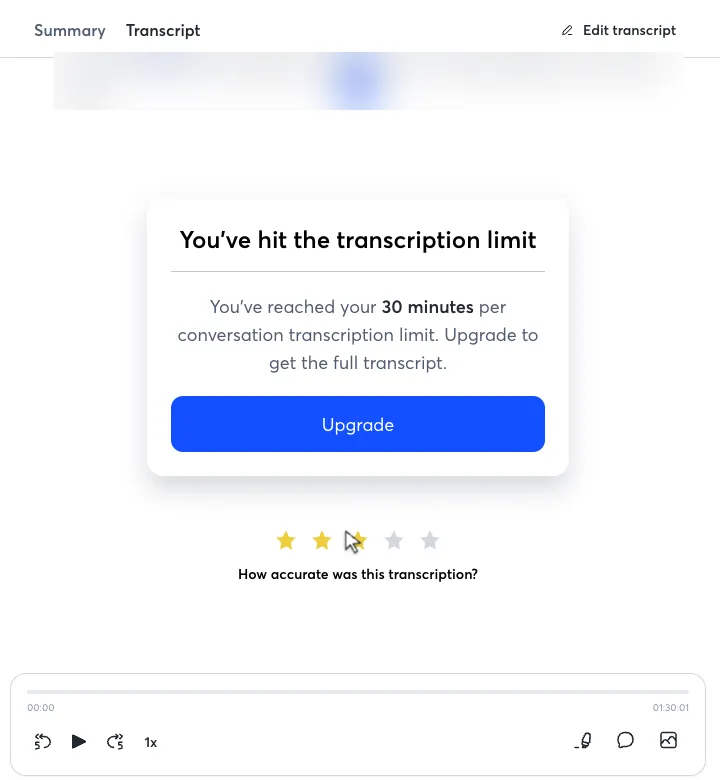
The 29-minute file came back whole, with two speakers labeled. The 90-minute file stopped at the 30-minute mark with a banner.
The cut file still used a full import, leaving 1 of 3, while only 30 minutes were added to the monthly counter (from 29 to 59 of 300).
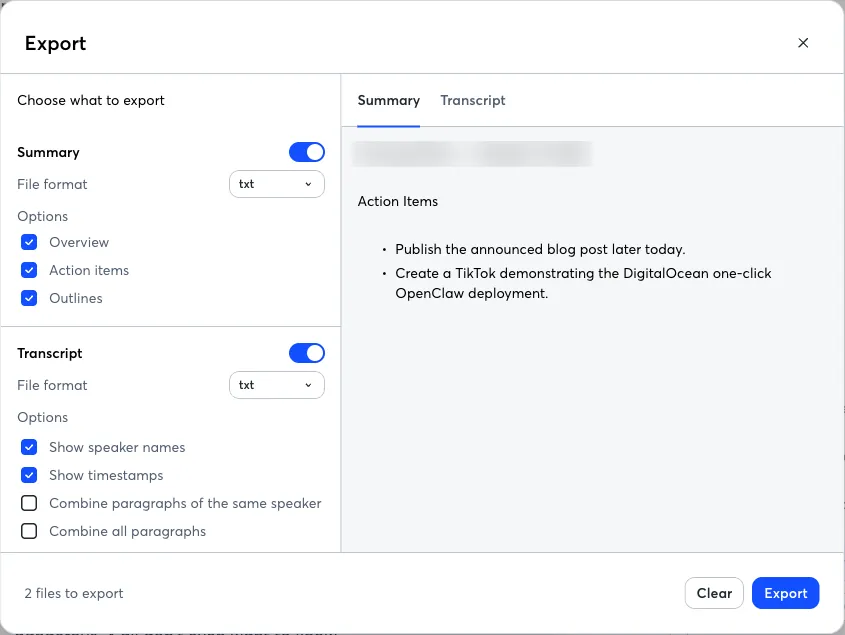
The export dialog for the cut file offers the same TXT options as for a complete one, with no warning. The downloaded transcript ends mid-sentence at 29:32, followed by "Transcribed by https://otter.ai". Otter's help center says that past 30 minutes you "will only be able to access up to 30-minutes", but nothing in the file says the rest is missing.
Otter vs Transcriv pricing and free limits
| Transcriv | Otter | |
|---|---|---|
| Account needed to try | No | Yes |
| Free: file allowance | 60 minutes for the lifetime of the account | 3 imports for the lifetime of the account |
| Free: monthly minutes | None; the 60 minutes don't renew | 300 a month, renewed monthly |
| Free: per-file limit | 60 minutes and 100MB | 30 minutes per conversation |
| Free: over the duration limit | Rejected before upload | Accepted, first 30 minutes transcribed |
| Paid, billed monthly | Pro: $9.99/month | Pro: $16.99/user/month; Business: $30/user/month |
| Paid, billed yearly | No yearly plan | Pro: $8.33/user/month; Business: $19.99/user/month |
| Paid: total allowance | 10 hours a month | Pro: 1,200 minutes and 10 imports a month |
| Paid: per-file limit | 5 hours and 2GB | Pro: 90 minutes per conversation |
Prices as of October 2026 (US). Sources: Otter pricing, Transcriv pricing.
Both free plans run out, in different ways. Otter's minutes renew every month, but the imports don't, so after three files Basic is mostly a live-recording plan. Transcriv's 60 minutes don't renew either, but you can spend all of them on one recording. A student with one 50-minute lecture should use Transcriv Free. Someone who records short meetings live in the Otter app can keep using Basic month after month.
On monthly billing, Transcriv Pro costs about $7 less than Otter Pro and accepts much longer files: 5 hours against 90 minutes per conversation. Otter Pro includes twice as many minutes (20 hours against 10). On annual billing, Otter Pro at $8.33 a month is cheaper than Transcriv Pro, so if you transcribe more than 10 hours a month and your recordings are under 90 minutes, Otter Pro on an annual plan is the better deal. Otter's import dialog points to Business for more imports, but its pricing page gives Pro 10 imports a month.
Exports, side by side
| Format | Transcriv | Otter |
|---|---|---|
| TXT | Yes | Yes (ends with "Transcribed by https://otter.ai") |
| DOCX, PDF | Yes | Pro only |
| SRT | Yes, when the transcript has timestamps | Pro only |
| VTT | Yes, when the transcript has timestamps | Not listed |
| Markdown, JSON | Yes | Not listed |
Strengths and limitations
Otter strengths
- Otter's Notetaker joins Zoom, Microsoft Teams, and Google Meet calls, and Otter's pricing page lists live transcription on Basic.
- The 300 Basic minutes renew every month.
- Speaker labels on free imports, and our 29-minute file was ready about 3.5 minutes after we chose it.
- Pro on annual billing is $8.33 a month for 1,200 minutes, and Otter lists a 20% discount for .edu accounts.
Otter limitations
- On Basic, transcripts export as TXT only, playback is 1x only, and only your 25 most recent conversations are kept.
- Even Pro stops at 90 minutes per conversation.
Transcriv strengths
- One free file can be up to 60 minutes, twice Otter Basic's per-file limit, and you can try it without an account.
- Seven export formats with no branding line added.
- Pro accepts files up to 5 hours and 2GB.
Transcriv limitations
- No meeting bot or live transcription. It only transcribes files you upload.
- The 60 free minutes never renew. After you use them, Free is done.
- No translation, speaker labels, audio restoration, or batch uploads. You upload one file at a time.
- Pro includes 10 hours a month, half of Otter Pro's 20.
- Without an account, the first two transcripts are shown in full. Later ones show a 75-character preview until you sign in.
Switching from Otter
- Check the recording's length and size: under 60 minutes and 100MB for Free, or under 5 hours and 2GB for Pro.
- Upload the original audio or video file. Transcriv doesn't import Otter transcripts, summaries, or speaker names, and if Otter cut a file at 30 minutes, the original recording is the only complete copy.
- Review names and quotes against the recording, then copy the text or download it in the format you need.
You can keep Otter for live meetings and use Transcriv for long recorded files. The interview transcription and audio-to-text pages describe the Transcriv workflow.
Other Otter alternatives, by need
If neither tool fits, these are worth a look for specific jobs:
- For many short files, TurboScribe Free takes 3 files a day, each up to 30 minutes, with no account. Our TurboScribe alternative page shows what it does with a longer file.
- For meeting notes from another vendor, Notta records Zoom, Teams, Google Meet, and Webex calls. Our Notta alternative page covers what its free account does with uploaded files.
- For human-checked transcripts, Rev offers transcripts produced by human transcriptionists, alongside its AI option. See our Rev alternative page.
- For subtitles and translation, Happy Scribe has a subtitle editor and translates transcripts and subtitles. See our Happy Scribe alternative page.
- For offline or private files, OpenAI's open-source Whisper model can run locally on your own computer, so audio never leaves it.
- For editing audio and video by text, Descript lets you edit a recording by editing its transcript.
Frequently asked questions
Is there a better app than Otter AI?
It depends on what you transcribe. For live meetings, Otter is built for the job: its Notetaker joins Zoom, Microsoft Teams, and Google Meet calls, and Transcriv has no meeting bot. For recorded files, Otter Basic allows 3 imports for the lifetime of the account, each transcribed up to 30 minutes. Transcriv Free accepts one file up to 60 minutes and 100MB, within 60 lifetime minutes, and Transcriv Pro accepts files up to 5 hours, while Otter Pro stops at 90 minutes per conversation.
Is Otter AI completely free?
No, but it has a free plan. Otter Basic needs an account and includes 300 transcription minutes a month, 3 audio or video imports for the lifetime of the account, and 30 minutes per conversation. Transcripts export as TXT only; DOCX, PDF, and SRT are marked Pro. A longer import is not rejected: in our October 2026 test, a 90-minute file came back with only the first 30 minutes and still used one of the 3 imports. After we signed up with Google, Otter offered a 14-day Business trial before we could choose the Basic plan.
Which is better, Notta or Otter AI?
For uploaded files on the free plans, Otter Basic did better in our October 2026 tests with the same 90-minute file. Otter transcribed the first 30 minutes and let us export them as TXT. A free Notta account charged all 90 minutes, showed about 3 minutes of readable text, and locked every export. Both are meeting assistants, so for live calls, compare their meeting features instead.
What is a free alternative to Otter AI?
For one recorded file between 30 and 60 minutes, Transcriv Free accepts a file up to 60 minutes and 100MB, within 60 lifetime minutes that do not renew, and you can try it without an account. For many short files, TurboScribe Free allows 3 files a day, each up to 30 minutes, with no account. OpenAI's open-source Whisper model is free to run on your own computer.
Transcribe a 30 to 60 minute recording for free
If it's under 100MB and you have enough Free minutes left, you can transcribe the whole interview or lecture in one upload.