Notta Alternative for Recorded Interviews and Lectures
Pick Transcriv if you have a recorded file, such as an interview, lecture, or recorded call, between 30 and 60 minutes and want the whole transcript for free. Its Free plan accepts one file up to 60 minutes and 100MB, within 60 lifetime minutes. Stay with Notta if you want meeting notes from Zoom, Teams, or Google Meet, a mobile recording app, or a lot of hours on a cheap annual plan. Transcriv doesn't record live meetings.
When we uploaded a 90-minute file to a free Notta account, it took 90 of our 120 monthly minutes and showed about 3 minutes of text, with every export locked. Notta's no-account converter did better with the same file: it returned the first 30 minutes and let us download them.
Prices and limits as of October 19, 2026.
Where to start, by situation
| Your situation | Start with | Why |
|---|---|---|
| One 45-minute interview, free | Transcriv Free | Fits the 60-minute, 100MB file limit if at least 45 of your 60 lifetime minutes remain |
| One 90-minute lecture, free | Neither free option covers it in one piece | Notta's converter gave us the first 30 minutes. Transcriv Free rejects files over 60 minutes before upload |
| One recording under 30 minutes, no account | Either | Notta's converter returned our 29-minute file in full, with downloads. Transcriv shows your first two transcripts in full without an account |
| Short clips (under 3 minutes) you only read in the app | Notta Free account | 120 minutes a month, with speaker renaming and text editing. No downloads |
| Live Zoom, Teams, or Meet calls, or recording on your phone | Notta | Notta says it records meetings and has mobile apps. Transcriv has no meeting bot |
| More than 10 hours of files a month | Notta Pro, billed annually | 1,800 minutes a month at $8.17/month. Transcriv Pro includes 10 hours |
Notta's free account advertises 120 minutes a month, which sounds like room for a 45-minute interview. But the limit that matters for a recorded file is "Up to 3 minutes duration per conversation", and it limits what you can read, not what you can upload. At 90 minutes both free options run out, but Transcriv tells you before the upload starts.
Have a recording between 30 and 60 minutes? Upload it to Transcriv Free. If it's over the limit, you'll find out before it uploads.
What happened to our files on Notta
In October 2026 we tried a 29-minute interview and a 90-minute recording on Notta, first through its free converter, which needs no account, then through a free Notta account.
The converter: 30 minutes, with downloads
Notta's "Start for Free" button leads to a sign-up page. The no-account converter is in the Features menu, under "Upload & Link Transcription". It returned the 29-minute file in full. The 90-minute file came back as its first 30 minutes, with a banner under the last line.
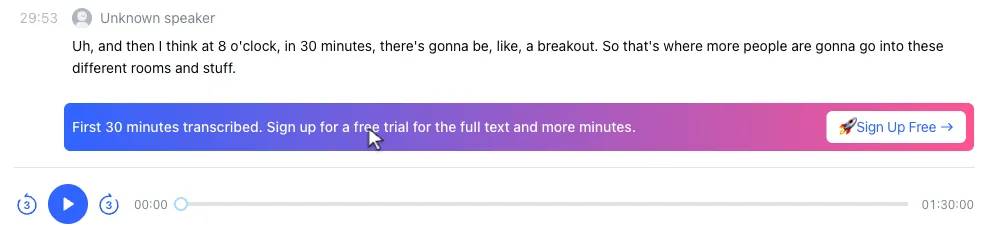
Downloads worked without signing in, in five formats: TXT, DOCX, SRT, PDF, and XLSX. The TXT of the long file stops at 29:53 with nothing saying an hour is missing. On the converter, every speaker is "Unknown speaker", and you can't edit the text.
The free account: charged in full, about 3 minutes readable
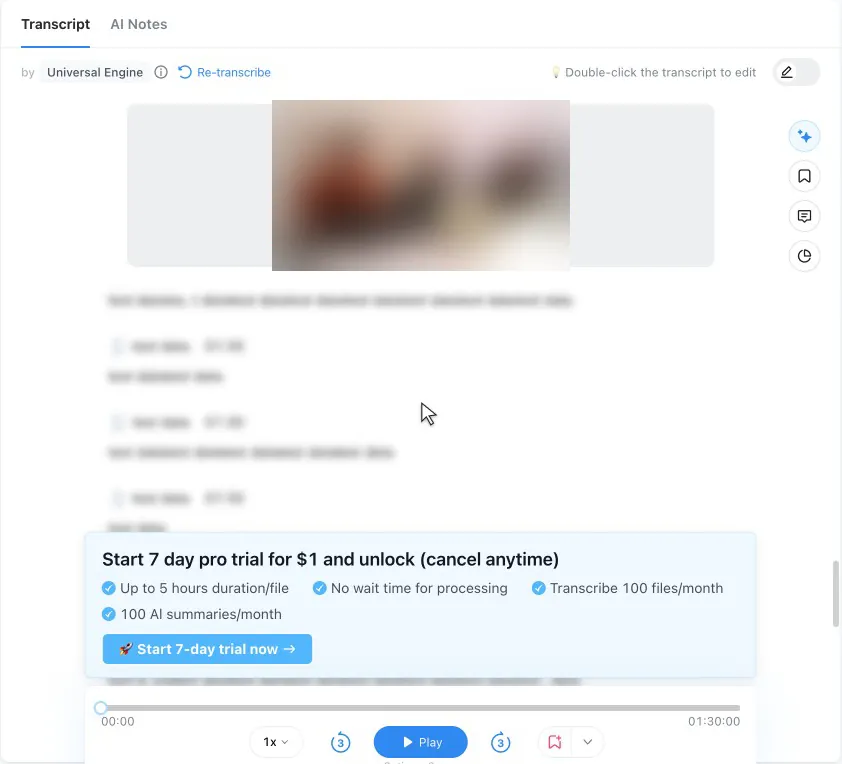
The import dialog lists "Max record: 5 hours" and doesn't mention the 3-minute limit or your remaining minutes. Both files went in without a warning. Readable text stopped at about 2:42 in the 29-minute file and about 3:29 in the 90-minute file. After that, the transcript turns into blurred blocks under a trial card, and nothing says the text has been cut.
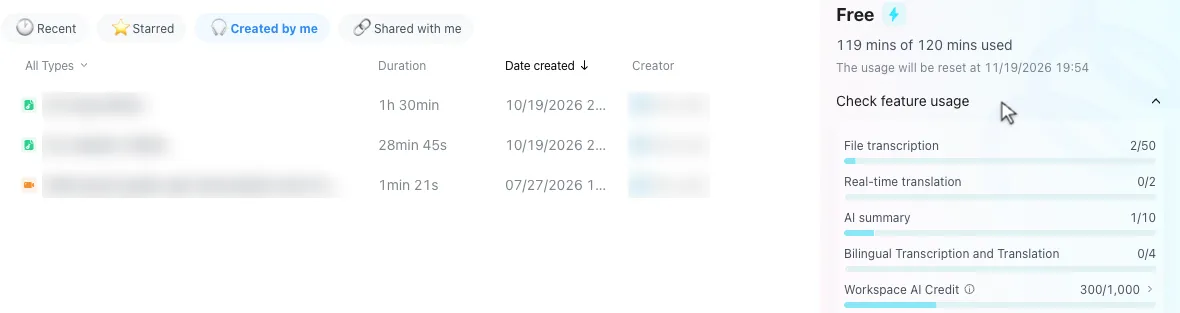
Both files were charged at full length. The two uploads used 119 of the 120 monthly minutes, for about 6 minutes of readable text.
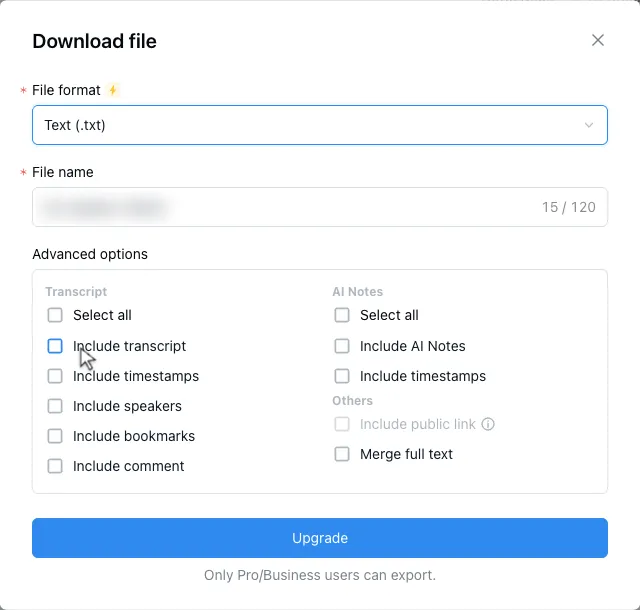
Nothing can be exported. TXT, DOCX, SRT, PDF, XLSX, and the original audio or video file all showed the same message, and Notta's plan page lists transcript export under Pro.
Notta's AI still reads the whole file. The free AI summary covered all 90 minutes, and Notta Brain, its AI chat, answered a question by quoting a passage from about 45 minutes in, deep inside the part we couldn't read.
The same 3-minute limit applies if you cancel a paid plan. Notta's pricing FAQ says that afterwards "you can only view the first 3 minutes of the transcript as a Free user", so export what you need first.
Notta vs Transcriv pricing and free limits
| Transcriv | Notta | |
|---|---|---|
| Account needed to try | No | No for the converter; yes for the app |
| Free: total allowance | 60 minutes for the lifetime of the account | Free account: 120 minutes and 50 file uploads a month. Converter: no counter shown |
| Free: per-file limit | 60 minutes and 100MB | Free account: uploads up to 5 hours, 3 minutes viewable. Converter: first 30 minutes |
| Free: over the limit | Rejected before upload | Free account: accepted and charged in full. Converter: first 30 minutes, with downloads |
| Paid, billed monthly | Pro: $9.99/month | Not shown on the pricing page we checked |
| Paid, billed yearly | No yearly plan | Pro: $8.17/month ($97.99/year); Business: $16.67/month ($199.99/year) |
| Paid: total allowance | 10 hours a month | Pro: 1,800 minutes and 100 uploads a month; Business: 200 uploads a month |
| Paid: per-file limit | 5 hours and 2GB | 5 hours per recording |
Prices as of October 2026 (US). Notta also lists a 50% education discount. Sources: Notta pricing, Transcriv pricing.
The free options measure different things. Notta's free account renews every month, but it suits short clips you read in the app. For a recorded file, Notta's converter is the better free option, up to 30 minutes with downloads. Transcriv's 60 minutes are a one-time allowance, but you can spend all of them on one recording. For a student with one 50-minute lecture, Transcriv Free covers it and neither Notta option does.
On annual billing, Notta Pro is cheaper than Transcriv Pro and includes three times as many hours (30 against 10), with the same 5-hour file limit. If you can pay for a year up front, Notta Pro is the better deal, especially past 10 hours a month. If you have a few long files a month and don't want an annual commitment, Transcriv Pro is month to month.
Notta describes its trial three different ways: "3-day Free trial" in the converter's FAQ, "Get a 7-day Business trial" on the pricing page, and "Start 7 day pro trial for $1" in the app.
Exports, side by side
| Format | Transcriv | Notta |
|---|---|---|
| TXT, DOCX, PDF | Yes | Pro and Business; free on the converter |
| SRT | Yes, when the transcript has timestamps | Pro and Business; free on the converter |
| VTT | Yes, when the transcript has timestamps | Not offered |
| XLSX | No | Pro and Business; free on the converter |
| Markdown, JSON | Yes | Not offered |
Notta's converter PDF has a "Powered by Notta.ai" footer. Transcriv does not add a branding line to exports.
Strengths and limitations
Notta strengths
- The free account renews 120 minutes and 50 uploads every month, and it was fast in our test.
- Free editing tools, including speaker renaming, text editing, bookmarks, and find and replace.
- The free AI summary and Notta Brain chat cover the whole file, including the part you can't read.
- Meeting recording for Zoom, Microsoft Teams, Google Meet, and Webex, plus mobile and desktop apps, according to Notta.
- Pro on annual billing is $8.17 a month for 1,800 minutes, and adds translation and exports.
Notta limitations
- The free account accepts long files without warning, charges their full length, and shows about 3 minutes.
- No exports from the free account.
- The converter cuts files at 30 minutes, labels every speaker "Unknown speaker", and doesn't let you edit.
- The pricing page we checked showed annual prices only.
Transcriv strengths
- One free file can be up to 60 minutes, transcribed in full.
- If a file is over the limit, you find out before it uploads.
- No account is needed to try it.
- Seven export formats (TXT, DOCX, PDF, Markdown, SRT, VTT, JSON) with no branding line added.
- Pro accepts files up to 5 hours and 2GB, billed monthly.
Transcriv limitations
- No meeting bot, live transcription, or mobile recording app. It only transcribes files you upload.
- The 60 free minutes never renew. After you use them, Free is done.
- No translation, speaker labels, audio restoration, or batch uploads. You upload one file at a time.
- Pro includes 10 hours a month, a third of Notta Pro's 1,800 minutes, and there's no cheaper yearly plan.
- Without an account, the first two transcripts are shown in full. Later ones show a 75-character preview until you sign in.
Switching from Notta
- Check the recording's length and size: under 60 minutes and 100MB for Free, or under 5 hours and 2GB for Pro.
- Upload the original audio or video file. Transcriv doesn't import Notta transcripts, summaries, or speaker names. If your free Notta account blurred most of a file, the original recording is the only complete copy.
- Review names and quotes against the recording, then copy the text or download it in the format you need.
Keep Notta if it records your meetings, and use Transcriv for the long recorded files. The interview transcription and audio-to-text pages describe the Transcriv workflow.
Other Notta alternatives, by need
If neither tool fits, these are worth a look for specific jobs:
- For live meeting notes, Otter.ai's Notetaker joins Zoom, Google Meet, and Microsoft Teams calls. Our Otter AI alternative page shows what its free plan does with uploaded files.
- For short files most days, TurboScribe Free allows 3 files a day, each up to 30 minutes, without an account. See our TurboScribe alternative page for what happens to longer files.
- For human-checked transcripts, Rev offers transcripts produced by human transcriptionists, alongside its AI option. See our Rev alternative page.
- For subtitles and translation, Happy Scribe has a subtitle editor and translates transcripts and subtitles. See our Happy Scribe alternative page.
- For offline or private files, OpenAI's open-source Whisper model can run locally on your own computer, so audio never leaves it.
Frequently asked questions
Is Notta AI a good transcription tool?
We did not measure its accuracy. In our October 2026 test it was fast: the free account finished a 29-minute file about 40 seconds after we submitted it, and a 90-minute file about 4 minutes after the upload started. For a long recorded file, the free account is the problem: it showed about 3 minutes of each transcript and exported nothing. Exports need Notta Pro or Business.
Which is better, Notta or Otter AI?
Both are built for meetings. Notta says it records Zoom, Microsoft Teams, Google Meet, and Webex calls, and Otter's Notetaker joins Zoom, Teams, and Google Meet calls. For uploaded files, their free plans fall short in different ways. A free Notta account charged our 90-minute file in full and showed about 3 minutes of it. Otter Basic transcribed the first 30 minutes of a 90-minute file, but allows 3 imports for the lifetime of the account. On annual billing, Notta Pro is $8.17 a month for 1,800 minutes and Otter Pro is $8.33 a month for 1,200 minutes.
How much does Notta cost?
As of October 19, 2026, Notta Free is $0 for 120 transcription minutes a month, with up to 3 minutes viewable per conversation. Pro is $8.17 a month billed annually ($97.99 a year) for 1,800 minutes a month, and Business is $16.67 a month billed annually ($199.99 a year). The pricing page we checked showed no monthly price. Transcriv Pro is $9.99 a month for 10 hours, with no yearly plan.
What is a free alternative to Notta?
For one recorded file between 30 and 60 minutes, Transcriv Free accepts a file up to 60 minutes and 100MB, within 60 lifetime minutes, and transcribes all of it. The free minutes do not renew. For files under 30 minutes, Notta's own no-account converter returned our 29-minute file in full with downloads, and TurboScribe Free allows 3 files a day, each up to 30 minutes, without an account.
Transcribe a 30 to 60 minute recording for free
If it's under 100MB and you have enough Free minutes left, you can transcribe the whole file in one upload.